Summarize with AI
by Cory Wasielczyk, Digital Media Strategist, Pink Dog Digital
Last week, a new app started appearing at the very top of the download lists for Apple and Google’s app stores. Muse is Meta’s newest AI offering, described as “your personal AI agent that gets things done, always working on what matters to you.”
Naturally, as Pink Dog’s resident AI expert, I decided to give it a download over the weekend and see what it could do.
Muse is an interesting piece of software because it is, I believe, the first attempt at a mainstream AI agent that we’ve seen.
But, first, we should take a step back and discuss what an AI agent even is.
AI Agents
An AI agent, at its most basic level, is an AI system that is designed to actually do tasks for you. Think about ChatGPT, Claude, or any other large language model (LLM). When you type a question into ChatGPT, the AI returns an answer to your question. The AI in these tools are able to use their internal training data, as well as search the internet, in order to find the answer to your question. But they aren’t designed to do any work for you (other than, I suppose, research).
The next phase of AI, after the content generation of current LLM technology, is AI that can actually answer your question, AND complete tasks for you. So, when you ask ChatGPT to find you the lowest price for a vacation flight, current systems will simply report the prices it finds online. But an agent will actually be able to book your ticket for you.
Over the last year or so, all of the major AI platforms have rolled out agents as part of their systems with varying degrees of success. For the most part, they can do tasks, but they’re also cumbersome, difficult to set up properly, and can eat through a ton of your usage budget if you’re not careful. Claude Cowork was the first system that became popular in the industry, with ChatGPT Work following not far behind.
AI as Your Personal Assistant
However, the big thing about AI agents, up to this point, was really that they were mostly designed to be effective at work tasks. When a lot of people think about AI agents, they usually think of an AI personal assistant – a smarter version of Siri, basically (which, coincidentally, Apple is rolling out in the coming months). These tools could function as personal assistants… but, again, being difficult to set up, it was challenging for even those in the know to do.
Muse is the first real development of AI that’s explicitly billed as a personal assistant (and, honestly, the first good AI offering from Meta since the launch of open-source model Ollama).
According to the app store description, Muse “manages email, books dinners, tracks budgets, and finds deals, with your approval”. So, this really does seem to be the AI assistant that we’ve dreamed of having since reading about them in sci-fi novels.
But does it actually stack up?
Muse: Beginnings
When I downloaded Muse over the weekend, I was greeted with a short intro from the AI and it prompted me to give it a name. I decided to go with the default option, even though I’m personally not that comfortable with humanizing artificial intelligence systems.
Other information that the AI gave me:
– With your approval, I can update your calendar, make purchases, and use the apps you connect.
– I have my own computer with a web browser, so I can keep getting things done even when you’re away.
– The more we work together, the better I’ll get at helping you.
The first statement tells me that this is an AI agent – no surprise, that’s what it’s billed as. The third statement is typical of all AI systems now that they have robust memory systems. This is probably a way to onboard people that are just getting started with AI tools.
The second statement is extremely interesting, though. This AI system can work autonomously, without needing to be switched on on a local device. AI agents, until now, needed a system turned on in order to function by itself. If you wanted Claude Cowork to work for you, even when away from your computer, you had to have that computer turned on in order for it to work. You even needed Claude to be open and operating on that computer. Muse doesn’t need that – all you need is to set it up, and it works on its own. This is a major breakthrough!
After this, I took a look around the app to see what it was about. It appears that Muse is designed to operate within a single chat window, as opposed to having separate chats for each topic/query like current systems do. I’m not 100% sure on this, because I haven’t used enough of the app to run into potential issues with memory.
Basically, if you keep prompting an AI system within a single chat window, eventually it starts to forget details from the start of the conversation because it has a limited working memory. Muse does have something called side chats where you can start separate conversations, but it appears that everything is designed to run from the main chat window. We’ll see whether it can keep up over time.
Testing the Ideas Tab
One of the things that I’ve always thought AI companies could do better at is giving people concrete ideas for how to use it effectively. There’s a lot of talk about how AI is “changing everything”, but when asked “how?”, most are light on details.
The Muse app tries to address this with its “Ideas” tab, where it provides several different use cases for its service. And tapping one of these ideas will start the process for setting it up within the main chat window.
So, I decided to give a few of these a try!
Test 1: Daily Summary
A daily summary feels like it’s one of the most basic things that we should expect from an AI assistant. And luckily, Muse has it up as one of the first ideas in its tab.
Once I tapped the idea, Muse began working on setting up the automation and asked me questions on what I wanted from my daily summary. I gave the app access to my inbox and calendar, and asked it for a few things:
– A section for anything work-related that needed my attention: client and colleague emails, upcoming meetings, etc.
– A news section. I asked Muse to summarize important news for me in my areas of industry expertise. In addition, I wanted a couple of top news stories, a few stories from Japan (useful for when I go back next year), and a sports section for my favorite teams.
After testing I noticed that the AI only gave me the summaries, but not links out to the original sources in case I wanted to learn more. So, I asked it to add these, and also give me the day’s dollar-yen exchange rate in the Japan section. And I asked it to send every weekday morning at 7:45am.
This test has mostly worked well. Below is a screenshot from a daily briefing, and it has fulfilled the criteria that I set out for the automation.

It completed without my input. There’s one small oddity – a news story in the Japan section about sumo wrestling, which is not important to me at all as I don’t follow sumo! But this is something you can prompt the AI to omit for future reports. So, as you get the daily reports, you can ask for tweaks where necessary.
Overall, I was impressed with this function and I think a lot of people would find it handy!
Test 2: Unclaimed Property
Another idea that piqued my interest was an unclaimed property search. Muse claimed it would go to the websites of various states’ unclaimed property portals, fill out the forms, and check whether I had any unclaimed property out there.
After tapping the idea to start the process, Muse asked me for some information on which states to prioritize, based on where I lived over the course of my adult life. So, I gave it the information and let it get to work.
This test was an unmitigated disaster. Upon starting the task, Muse opened several web browser instances that you could actually view as it was working, which I thought was pretty cool. However, the AI failed at something extremely basic. It couldn’t pass the CAPTCHA test on any of the state database websites! Or, more accurately, it was presented the CAPTCHAs, then asked for my permission to click through and pass the CAPTCHAs. After I gave it permission, it failed the CAPTCHAs anyway, then told me I had to go and fill out and submit the forms myself.
This is something to keep in mind if you’re looking to use an AI assistant to help you buy things like concert tickets. Most major merchants these days use CAPTCHA as a spam prevention tool. If Muse can’t pass a CAPTCHA, then it is effectively useless at making purchases.
It could be something that develops over time, but as of right now, if you’re hoping Muse will snag you that once-in-a-lifetime travel deal as soon as it is available, you’re likely to end up disappointed.
Test 3: Goal Setting
The final test I ran in the ideas tab was setting a goal. Muse offered to develop a plan and a document for me for any goal that I could think of.
To test this, I decided to tell it that my goal was to learn how to play Tekken 8, a competitive fighting video game that has a famously difficult learning curve.
After asking me some questions about my history of playing other fighting games like Street Fighter, and deciding on which character I wanted to play, Muse set to work developing a document for me. I closed the app and let it work while I played with my niece. When I came back, there was a notification that the document was ready.
The output was a Markdown file consisting of basic information about the character I had chosen, their key moves, and things that I should practice. The document was… moderately useful. It drew information from an up-to-date source, which is great: video games have patches that change the gameplay all the time, so it would’ve been really easy for the AI to pull out-of-date information.
To be honest, I could have gotten all of this information with a short Google search of my own. But, as a whole, it wasn’t too bad.
As a follow-up, I asked Muse to come up with another document on how to overcome nervousness before competing. I gave it some context about myself and let it start. Again, the AI worked on this task with the app closed, while I went and did something else.
The first page of that document is below. Notice the style of the document. I’ve never seen an AI generate a document with this kind of attention to style. I was even impressed with the little graphic at the top right.
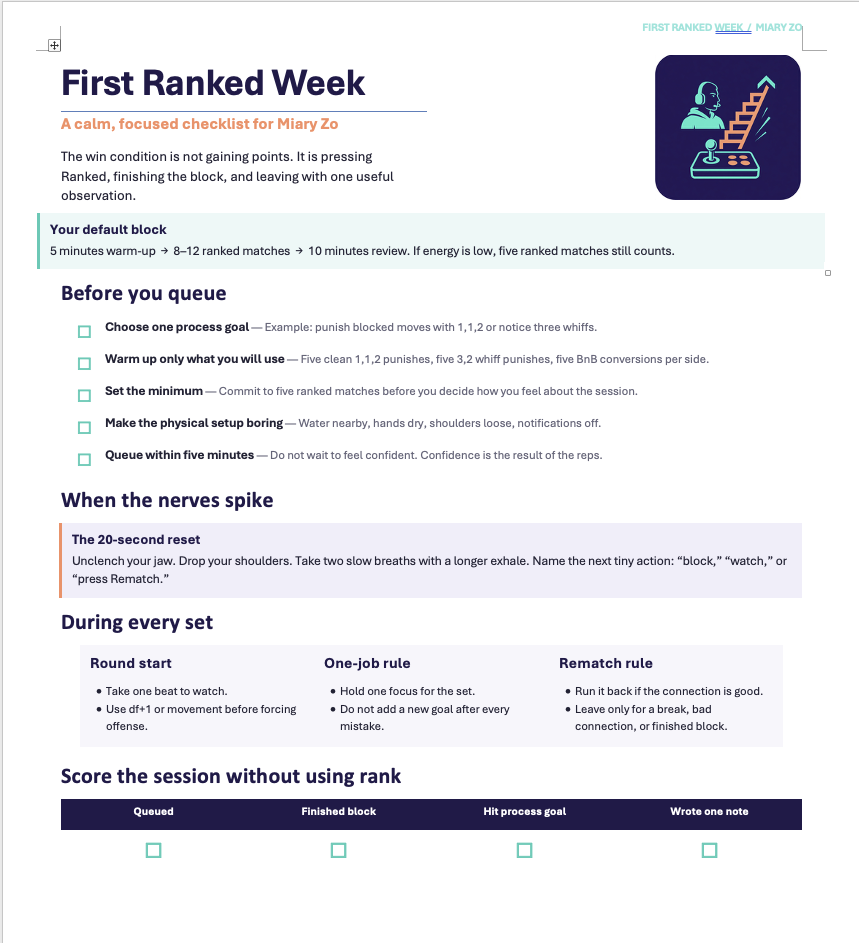
Time will tell whether an AI will turn me into a master of Tekken, but as far as coming up with a game plan and some documents to support that plan, I think it turned out okay.
Should You Use Muse for Your Small Business?
I think Muse is undoubtedly a capable AI assistant, and there’s no question that it’s easier to use and set up than previous AI agent programs. But should Baltimore small business owners add it to their workflows?
It depends on your goals. For small automated tasks like the daily summary and getting notifications about important emails, it seems to be really good.
But there are some ways in which I feel like this tool may not be as good as tools like Claude Cowork or ChatGPT Work. For example, Muse notified me about an email from a colleague and told me it drafted a reply for me to look at in my drafts folder. It didn’t send the email, thankfully, but I also never prompted it to draft replies for me. Nor would I ever, because personally I don’t ever use AI to write my emails.
Some people do, and that’s fine, but Muse doesn’t seem to be a good tool for this. I couldn’t find a place in the app to upload any context files. This is critical because if you don’t give an AI examples of your emails or the way you communicate, it will draft very generic emails that don’t sound like you at all. And I think most people would spot the mismatch instantly.
For some situations, like emailing a customer service agent, that sort of thing isn’t that important. But when you’re dealing with clients or customers, it could make a world of difference.
Moreover, if you’re hoping Muse will help you automate purchasing, you’re likely going to end up disappointed. I’m still not very keen on giving AI access to anything financial-related, so I’m not really looking for Muse to buy my next flight to Tokyo the instant it’s under a certain dollar amount. Someday, it will get there: every AI company has been working on this for the last couple of years, but it’s not there yet.
And the last thing to remember? When giving AI access to your personal accounts, there’s a risk/reward tradeoff that you need to consider. Are the risks worth the reward? For some industries, the answer is an unqualified no: healthcare facilities cannot give public-facing AI systems access to patient data without violating HIPAA. Not every industry is as protective of customer data as healthcare, but you should still think about the potential risks of having your data ingestible by an AI system.
Some business owners are naturally risk-averse, and that’s okay! You could probably still find ways to let Muse or another AI assistant enhance your day-to-day, if you want to give the app a try. But if you do decide to give your AI access to your accounts, set strict guardrails and make sure you review any output before it is used or sent out.
I will be very interested to see whether Muse has the staying power to drive AI agents forward and whether this app propels Meta into the broader AI development conversation.
If you’d like to learn more about how to use AI more effectively in your organization, give us a call here at Pink Dog Digital to schedule a consultation.
Work With Pink Dog Digital to Strengthen Your Digital Marketing Strategy
Figuring out which AI tools are worth adopting, and how to fit them into a strategy that reflects your business, is a lot easier with an outside set of eyes. We’ve spent years helping small businesses build marketing systems that work without adding more to their plate, and we can help you sort out what’s worth your time here too.
Our services include:
- Digital advertising
- Social media management
- Content creation
- Search engine optimization
- Generative engine optimization
- Web design
Call us at 410-696-3305, email [email protected], or reach out through our website.